
Enterprise is the lab data platform from Alpha Technologies. It brings results from your Alpha Premier instruments and other testers into one secure database, checks them against your specifications, and turns them into statistics, reports and alerts your team can act on immediately.
Your instruments produce a constant stream of data from labs around the world. The hard part is making sense of it. Enterprise connects, organizes and analyzes that data so your people spend their time on decisions, not spreadsheets.
Results flow in automatically from Alpha Premier instruments and third-party density, hardness and tensile testers.
Every result is tied to its ingredient, compound, batch and specification in one searchable database.
Instant statistics, control charts and histograms show trends before they become problems.
Clear pass/fail status, automated notifications and ready-made reports put the right information in front of the right people.
Search by test method, date range, compound or sample ID, then narrow the results in seconds with Quick Filter.
Recalculate curves, overlay traces and remove outliers. Add a new data point or change a limit, and Enterprise updates historical results and their pass/fail status.
View any data point as an X-chart or histogram, with the full set of statistical calculations one click away.
Manage ingredients, compounds and products in one place, and group them by shared attributes, such as sidewall or tread compounds.
Build your own calculated data points with if/then logic and formulas, then apply them to single tests or groups of tests.
Create unlimited users and privilege groups. Each user's language and number format follow them to any workstation.
A clear, full-screen “Fail” status gets the operator’s attention from across the lab. Add the WorkOrder module and Enterprise automatically notifies everyone who needs to know, so issues are handled before they reach production.
Every result is checked against your specifications the moment the test finishes.
Define, edit and group specifications and limits, and apply changes to past results.
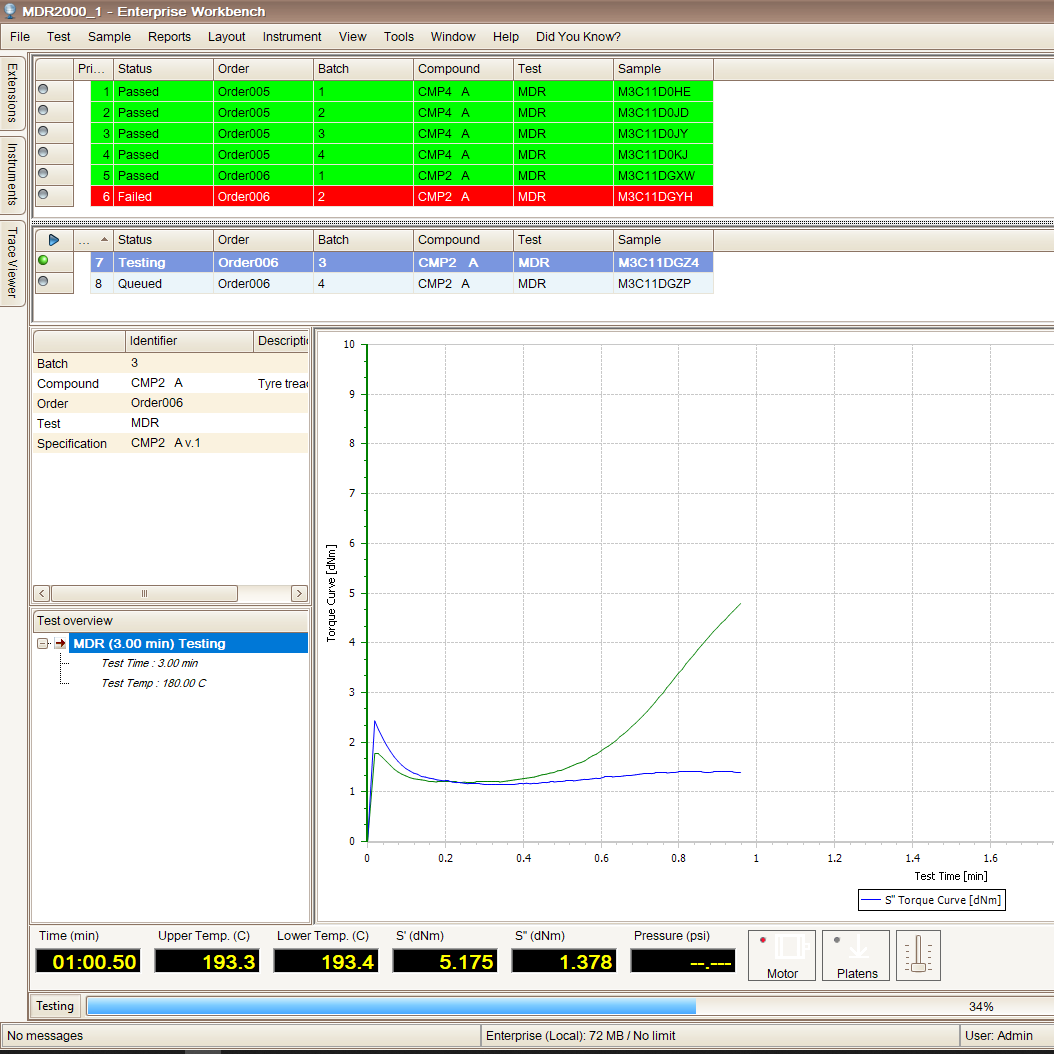
The WorkBench add-on controls all Alpha Premier instruments and collects readings from many non-Alpha testers, including density, hardness and tensile, assigning each result to the right data point in Enterprise.
The same WorkBench screens and routines on every instrument means less training and fewer errors.
Start with pre-built single-result and overview reports, or design your own with your logo, colors and formatting for management reviews and customer audits.
Start with the core platform and add capabilities when you need them.
Secure access to the Enterprise database from anywhere on your network, with your personal language and display settings.
Automate business rules: import orders and data from other systems, export results, and send email notifications with attachments.
Add formulation, mixer definitions and control sequences. Calculate formulas by PHR, build bills of materials and create production mixing instructions.
A fully managed R&D testing environment with formula development, a test-sequence editor, lab control and expanded reporting.
IT teams are busy, and getting the most out of a platform as capable as Enterprise takes time. Alpha’s software applications engineers can build new routines and calculations, help you find new ways to interpret your data, troubleshoot issues, and install patches and upgrades.
| Processor | Intel i5 or equivalent |
| Memory | 4 GB RAM minimum (8 GB or more recommended) |
| Storage | 20 GB free disk space |
| Operating system | Windows 8.1 Update 1 or Windows 10 version 1803 or later (x86 and x64), with the latest critical and important Windows updates |
| Network | TCP/IP 100 Mb (1 Gb recommended) |
| Web server | Microsoft IIS |
| Browser | Microsoft Edge, Chrome, Firefox or Internet Explorer 11 |
| Processor | Intel i5 minimum (Intel i7 or better recommended) |
| Memory | 16 GB RAM |
| Storage | 20 GB free disk space (100 GB or more recommended) |
| Operating system | Windows Server 2012, 2016 or 2019 or newer (x64), with the latest critical and important Windows updates |
| Network | TCP/IP 100 Mb (1 Gb or higher recommended) |
| Web server | Microsoft IIS |
| Browser | Microsoft Edge, Chrome, Firefox or Internet Explorer 11 |
| Database engine | Microsoft SQL Server (required by Enterprise version 6) |
| Included | Microsoft SQL Server 2019 Express is included with the installation |
| Recommended for servers | A full (non-Express) edition of Microsoft SQL Server |
| Supported versions | SQL Server 2012 SP4, 2014 SP3, 2016 SP2, 2017 CU22 and 2019 |
Schedule a demo with an Alpha software specialist and see how Enterprise can connect your instruments, standardize your quality checks and turn your test results into better decisions.